
If you looked at your cell phone last Wednesday, January 14, 2026, and saw ‘SOS‘ where your signal bars usually appear, you weren’t alone.
Verizon, the nation’s largest wireless carrier, experienced a massive service disruption that left an estimated 1.5 million Americans unable to make calls, send texts, or access mobile data for much of the day.
The outage began around noon Eastern Time on January 14 and persisted for approximately ten hours before Verizon announced late that night that service had been restored.
At its peak, more than 319,000 Verizon customers simultaneously reported problems to the outage-tracking site Downdetector, which received over 2.3 million total reports related to the incident.
For older Marylanders, particularly those who live alone or rely on their cell phones as their primary link to family and emergency services, this wasn’t merely an inconvenience.
It was a stark reminder of how dependent we’ve all become on wireless technology – and how important it is to have backup plans in place.
What Caused the Outage
Verizon has since confirmed that a software issue – not a cyberattack – caused the outage.
“This was a software issue, and we are conducting a full review of what happened,” a Verizon spokesperson stated.
“As of now, there is no indication that this was a cybersecurity issue.”
Law enforcement sources have indicated they believe the problem originated from a server failure in New Jersey.
What Happened in Maryland
Maryland emergency management agencies moved quickly to alert residents.
- Montgomery County’s Office of Emergency Management confirmed the outage was affecting calls to the county’s 911 system for some Verizon customers.
- Baltimore City’s Office of Emergency Management issued similar warnings.
- Regional emergency officials and technical experts clarified that while 911 calls may connect in SOS mode, dispatchers cannot call you back if the line drops because your phone has not registered on the network.
WBAL reported that local emergency services were advising residents who couldn’t reach 911 to use a device from another carrier, a landline, or physically go to a nearby police precinct or fire station.
Richard Forno, a cybersecurity expert at UMBC’s Cybersecurity Institute, told WBAL-TV that the cause remained unclear at the time but appeared to be limited to Verizon’s network. Interestingly, some smaller carriers that use Verizon’s infrastructure – known as mobile virtual network operators – continued operating normally throughout the outage.
Why This Matters for Older Adults
This outage highlights a significant shift in how Americans communicate.
According to the U.S. Centers for Disease Control and Prevention, only about 29% of American adults still have a landline phone – down from over 90% in 2004.
Meanwhile, data analyzed by the American Enterprise Institute (sourced from the CDC) shows that about half of adults aged 65 and older still have a landline in their home, the highest rate of any age group.
For those who have already transitioned to cell-only households, Wednesday’s outage created real vulnerability.
The National Institute on Aging notes that older adults who live alone face particular challenges during emergencies -they’re less likely to have emergency supplies readily available and less likely to have discussed evacuation plans with family or friends.
A University of Michigan study found that older adults who use mobility aids or medical equipment requiring electricity report lower confidence in their ability to handle extended outages.
When you add communication failures to that mix, the isolation compounds.
What ‘SOS’ Mode Actually Means
Many people may not realize that when your iPhone displays ‘SOS‘ in the corner, it doesn’t necessarily mean you have lost access to emergency services.
This indicator means your phone cannot connect to your carrier’s network at that time.
However, your cellular service may still reach 911 via other available networks or, on newer iPhone models (14 and later), via satellite.
What You Can Do Now
Verizon resolved the outage, but the next one could happen at any time – and your carrier might be next.
Christina Farrell, First Deputy Commissioner of New York City Emergency Management, put it well during the incident: “Everybody should have a network, whether it’s your family, your friends, neighbors, your co-workers.”
Consider Keeping or Reinstating Landline Service
Traditional copper landlines receive power directly through the phone line itself, separate from your home’s electricity; they often work during power outages when cell towers go dark.
While cordless phones require electricity to function, a basic corded phone plugged directly into a landline jack will work as long as the phone line is intact.
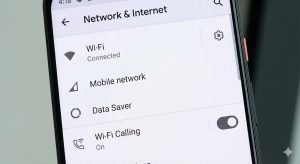
Enable Wi-Fi Calling on Your Cell Phone
During the outage, Verizon customers connected to home Wi-Fi could still make calls if they had enabled Wi-Fi calling.
On an iPhone, go to Settings > Cellular > Wi-Fi Calling.
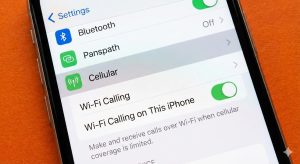
On Android phones, look for the Wi-Fi Calling option in your Calls or Network settings. This feature is free and takes only moments to set up.
Marylanders: Know Your Neighbors
FEMA’s Disaster Preparedness Guide for Older Adults emphasizes building a support network.
- I encourage you to connect with a trusted neighbor and develop a plan to check on one another – especially during emergencies.
- If your neighbor uses a different cell phone carrier, they may be able to make calls when you can’t.
Keep a List of Emergency Contacts on Paper
- If you need to use someone else’s cellular phone or a landline to reach family in an emergency, you’ll need to know their numbers.
- Most of us have stopped memorizing phone numbers, but having them written down somewhere accessible can make a big difference.
Know Where Your Nearest Maryland Fire Station and Police Precinct Are Located
- If you cannot reach 911 by any means, you can go to your nearest fire station or police precinct to report an emergency.
- Keep the addresses in that same paper list of contacts.
Keep Your Phone Charged
- A phone with a dead battery is useless regardless of carrier status.
- Consider keeping a portable battery pack charged, or at a minimum, make it a habit to charge your phone overnight.
If You Have Medical Alert Devices, Verify How They Connect
- Some fall detection devices and medical alert systems rely on cellular networks or landlines to call for help.
- Contact your medical alert provider to understand what backup options exist if one method fails.
How to Claim Your $20 Verizon Credit
If you were affected by the outage, Verizon is offering a $20 account credit.
Here’s how to claim a $20 credit:
- Wait for a text message from Verizon notifying you that the credit is available.
- Open the myVerizon app on your phone.
- Follow the redemption instructions in the app.
- The credit should appear within one to two billing cycles.
If you don’t have the app or prefer another method, you can also claim the credit by calling Verizon customer service at (800) 922-0204, using online chat, or visiting the Verizon website.
Verizon will contact business customers directly about their credits.
Important note: The $20 credit is per account, not per phone line.
A family with multiple lines receives the same credit as someone with a single line.
The Bigger Picture on Cell Phone Outages
New York State Assembly Member Anil Beephan has called on the Federal Communications Commission to investigate the outage, citing the “significant and unacceptable impact on public safety, including disruptions to reliable access to emergency communications and critical response systems.”
FCC Chair Brendan Carr has said the agency will review the incident “and take appropriate action.”
This outage wasn’t the first major carrier outage in recent memory:
- AT&T experienced an all-day outage in February 2024, prompting an investigation by the FCC.
- T-Mobile suffered significant problems in November 2024.
- Verizon itself experienced a similar nationwide outage in late 2024, affecting over 100,000 users.
The reality is that no wireless carrier is immune to service disruptions – whether from technical glitches, cyberattacks, or natural disasters.
The generation that sent us to the moon – my grandparents’ generation – didn’t grow up dependent on smartphones.
Planning Ahead for Future Outages
The key is planning – not in fear, but with the same practical wisdom you’ve applied to challenges throughout your life.
If you found yourself unable to make calls last Wednesday and didn’t know what to do, let that be the prompt to make a plan.
- You may consider connecting with family members or a trusted friend about backup communication methods.
- Check in with neighbors.
- And you may even consider whether that landline you gave up years ago might be worth having again.
Maryland Emergency Resources
- Montgomery County Office of Emergency Management: Follow @ReadyMontgomery on social media for alerts
- Baltimore City Office of Emergency Management: Follow @BaltimoreOEM for updates
- Anne Arundel County Office of Emergency Management (MDEM)
- Maryland Department of Emergency Management
- FEMA Disaster Preparedness Guide for Older Adults: ready.gov/older-adults
